Shortcut: ⌘2 (Windows: Ctrl+2)
What does it show?
Since last time is yesterday's status for all your domains, one line each, with the most important at the top: domains that need action (Act), then those that should be watched (Watch), and finally one combined line for those where everything is calm. The view also says when you last looked here, so you can see what is new since then.
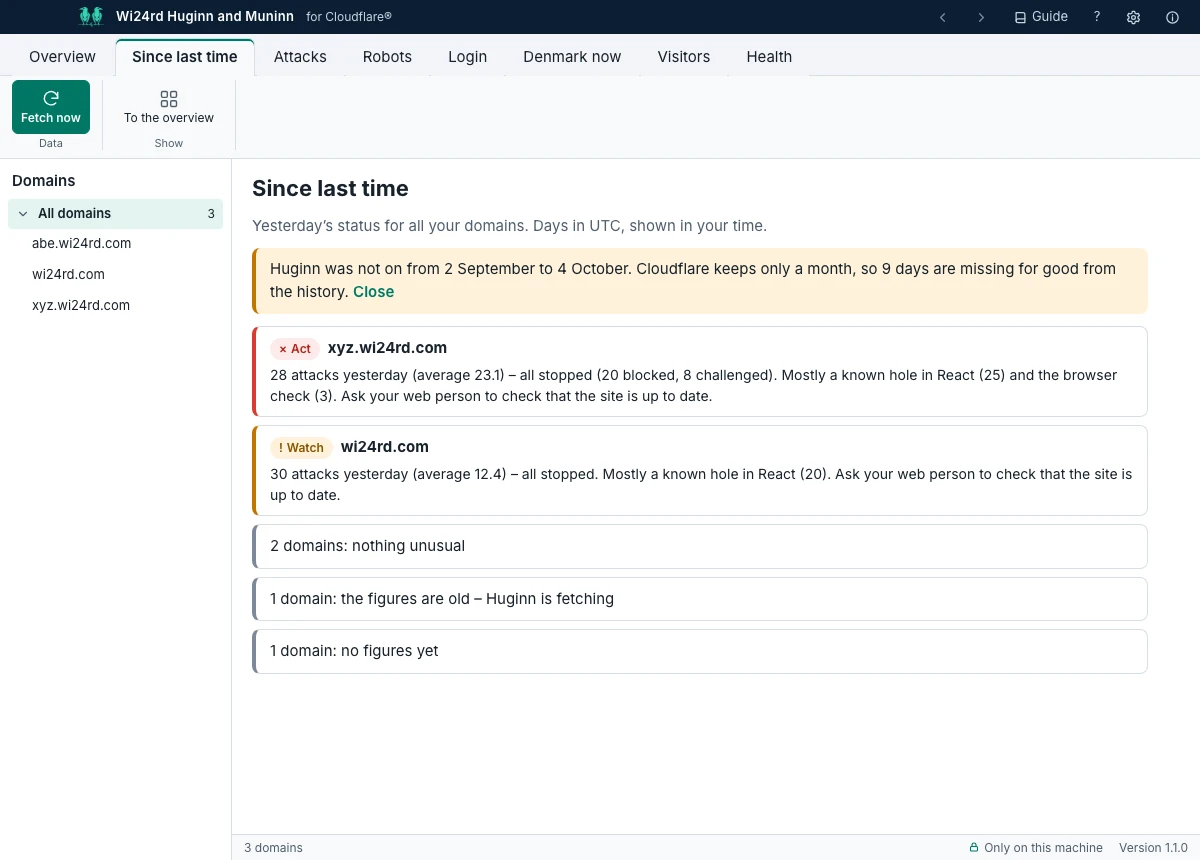
The view opens by itself when you click a notification or choose Since last time in the menu at the raven icon in the menu bar. The number on the tab Since last time shows how many domains are at Act.
At night (until 03:00 UTC), before yesterday is fully fetched, it shows the status for the day before yesterday and says so.
What do I do when …
- … a domain is at Act? Read the line, and click the domain to see the attacks. The advice behind What do I do? in the Overview applies here too.
- … a domain is at Watch? Read the explanation. Most often everything was stopped; the line says what was unusual.
- … it only says "All quiet"? Nothing. Click To the overview if you want to see the figures anyway.
- … there is a line about a new AI robot? A robot the program has not seen on the domain before has read your site. See Robots for what it means, and what may happen if you block it.
Click on
| Click | Opens |
|---|---|
| A domain card | Attacks for the domain |
| The chip with the status or label ("Act", "Looks …") | The guide: what it means, and what you do |
| A combined line ("2 domains: nothing unusual") | Overview |
| Your server did not answer: see the hours in Health (on a domain whose server did not answer) | Health for the domain and the day |
| The line about a new AI robot | The robot in Attacks |
| To the overview | Overview |
Figures and terms
- The status compares yesterday's attacks with the average of the week before. Whole days in UTC.
- Each domain is reported at most once a day in the notifications, but Since last time always shows the current status, whether or not you were notified.
