Huginn and Muninn is a program for your own computer that shows what is actually happening against your own Cloudflare domains: attacks, robots and login attempts, on one screen and explained in plain language. The program talks to Cloudflare only with an API Token that can only read, and keeps the figures on your computer, so the history outlives Cloudflare's month.
- Huginn (thought) is what is happening now: the attacks, what was stopped and how.
- Muninn (memory) is what has happened: every finished day is kept locally.
Status: version 1.1.0 for macOS (Apple silicon). The program is signed with Developer ID and notarised by Apple. This guide follows that version.
How the guide is organised
| Chapter | Read it when you … |
|---|---|
| Before you start | want to know what the program does, does not do, and what it needs |
| Installation | need the program on your computer and want to check what you downloaded |
| Setup | need to connect the program to Cloudflare and choose domains |
| Create an API Token at Cloudflare | want to see step by step, with screenshots, what to do in Cloudflare's dashboard |
| The views | use the program day to day: Overview, Since last time, Attacks, Robots, Login, your country, Visitors, Health, Technology |
| Settings | want to change language, appearance, notifications or the API Token, or choose domains |
| Notifications and background | want to understand when the program speaks up, and what happens when the window is closed |
| Data and history | want to know where the figures live, for how long, and how to reset |
| Troubleshooting | see an error text in the program |
| Updating | want a newer version |
| Uninstalling | want to remove the program completely, without leftovers |
| Keyboard shortcuts | want to drive the program from the keyboard |
| Glossary | meet a word you do not know |
The views
| View | Read it when you … |
|---|---|
| Overview | want the status of all your domains on one page and to know if anything needs action |
| Since last time | want to see what happened yesterday and which domains need action or watching |
| Attacks | want to see what Cloudflare stopped at the Edge, how, by which rules and from where |
| Robots | want to know which search engines, AI robots and other bots read your site |
| Login | want to see the attempts on your site's login pages and how many reached your server |
| Your country now and the World | want to compare the attacks on your domains with your country and the world |
| Visitors | want to see how many visit your site, from where, and which pages they see |
| Health | want to know whether your website answered and how much Cloudflare handled itself |
| Drill-down | want to dig into a figure, a country, a rule, a robot or a path on Attacks |
| Technology by domain | want to tell the program what your site runs, so the status hits the right attacks |
| Connect to Cloudflare (setup) | need to connect the program to Cloudflare the first time with the guide |
| Settings (the view) | want to find language, appearance, domains, notifications, API Tokens or About |
The short version
- Install the program and open it. A guide with four steps opens by itself.
- Create an API Token at Cloudflare with the two read permissions the program asks for, and paste it in step 2 of the guide.
- In step 3, choose which domains Huginn should fetch and show. Later you change it on Overview with the button Choose domains.
- Close the window. The program stays in the menu bar, fetches in the background and tells you when a domain needs action.
The rest is for those who want to understand more. Everything in the program that has figures behind it can be clicked, so you can see what the figure is made of.
The window
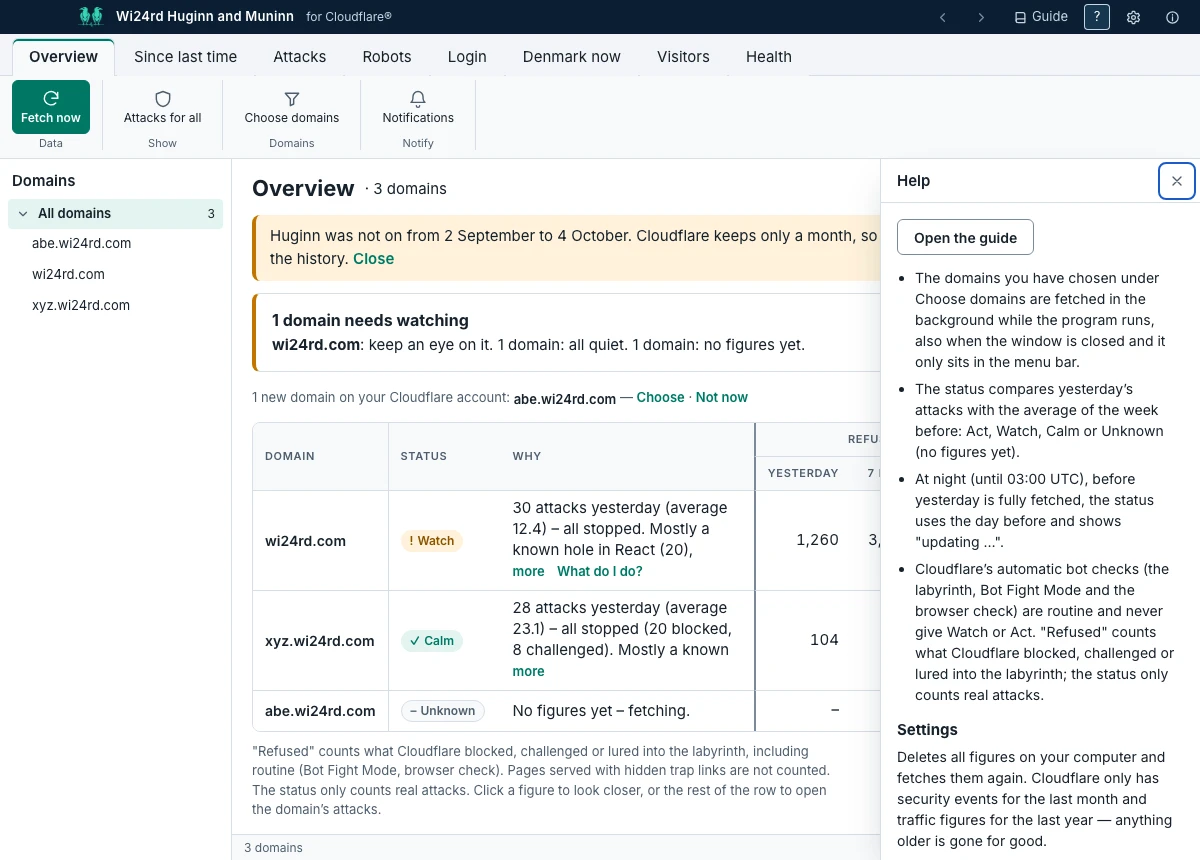
At the top is a title bar with the program's name, back and forward, Guide (this guide on wi24rd.com in your browser), ? (help: the explanations for the view and the shortcuts), the gear (Settings) and i (About). Below it are the tabs and a band with the buttons for the view you are in, with Fetch now first. On the left is the list Domains, where you choose one domain or All domains. The footer at the bottom shows the status, for example "Fetching 3 of 7" or "Updated 08:01", and the version.
Licence and trademark
The program is open source under the Apache-2.0 licence. Cloudflare® is a registered trademark of Cloudflare, Inc. Wi24rd Huginn and Muninn is not affiliated with Cloudflare, Inc.
