Shortcut: ⌘5 (Windows: Ctrl+5)
What does it show?
Login shows what happened on your site's login pages: how many attempts Cloudflare stopped at the Edge, how many hit a page that does not exist, and how many reached your server. The program never guesses what your site runs; you turn on the paths that are logins on your own site.
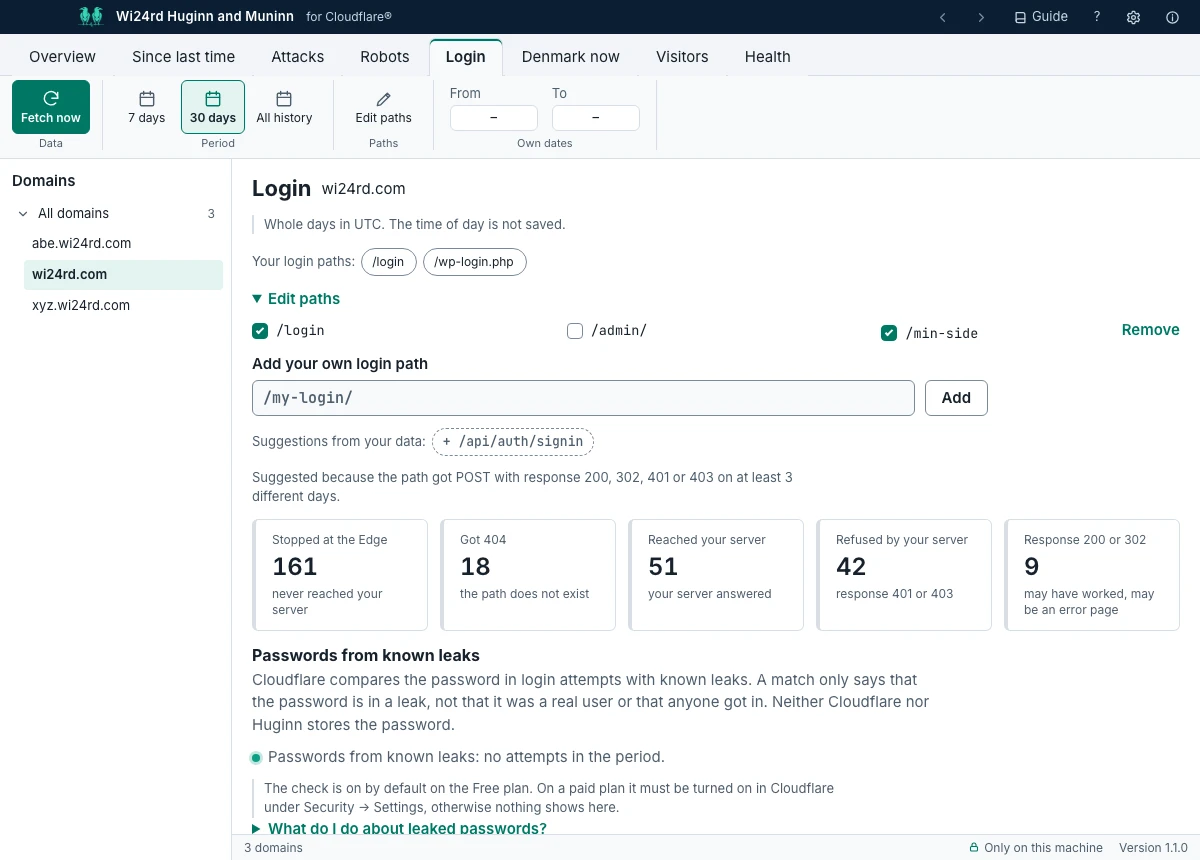
The three figures come from separate sources and are never added up, not even in the drawing:
| Figure | Means |
|---|---|
| Stopped at the Edge | Attempts Cloudflare refused or challenged before they reached your server. |
| Got 404 | Attempts on a path that does not exist on your site. Typically scanners looking for WordPress on a site without WordPress. |
| Reached your server | Attempts your server itself answered. Responses 401 or 403 are refused. Responses 200 or 302 may be a login, but may just as well be an error page. |
Passwords from known leaks: Cloudflare compares the password in login attempts with known leaks. The program shows per day and path how many attempts used a leaked password, and how many reached the server. A match only says that the password exists in a leak, not that it was a real user, or that anyone got in. Neither Cloudflare nor the program stores the password. A request without a password stands as "Not a login attempt (no password sent)" and never counts as a leak.
Login paths
- The starting list can be turned on with one click:
/wp-login.php,/wp-admin/,/xmlrpc.php,/admin/,/administrator/,/user/login,/loginand/signin. - Your own paths: enter the path under Add your own login path, for example
/my-login/. At most 20 paths of your own per domain. - Suggestions from your data: a path is suggested only if its name has a login word as a whole word (
login,oauth,passwordand the like), or Cloudflare's check saw a password on it, and it got POST with response 200, 302, 401 or 403 on at least 3 different days. Paths that merely resemble a login, such asadmin-ajax.php, are not suggested, and a path from a known rule's events is never suggested.
What do I do when …
- … many attempts reached the server with response 200 or 302? Check whether it was you or your colleagues. If not, make sure the login page requires strong passwords and preferably two steps (2FA), and consider a rule at Cloudflare that challenges the login page.
- … leaked passwords reached the server? That gives at least Watch, and Act if your server answered 2xx or 302. Change the password on the account it may concern, and turn on two steps.
- … there are many "Got 404"? That is routine: scanners trying known login pages. If your site does not use them, nothing happens.
- … it says "not available"? Your Cloudflare plan lacks the fields needed. The rest of the program works.
Click on
Clicking a figure, a path, a country or a network stays in Login with one more filter. Only a path on which the Edge has stopped something opens Attacks, because Attacks only knows what the Edge stopped. Show only … under leaked passwords filters on a day or a path. Edit paths opens the list of paths.
Figures and terms
- The program sees no IP addresses, and Cloudflare may use samples.
- The figures for Login are fetched separately, at a slow pace after the normal fetch and only for finished days. The first time takes up to an hour for 30 days.
- The path is never in a notification.
