
Security tip 7 · Static sites
Ditch the web host.
A website that shows text and pictures does not need a server that has to be patched. Put it on Cloudflare: free, fast all over the world – and no WordPress for the robots to knock on.
Last checked 1 November 2026
- Time
- ~30 min once the site exists as files
- Price
- Free static files are free and unlimited
- Server
- None nothing to patch
- Needs
- The site as files HTML, CSS, images
Why
What does not exist cannot be hacked.
A classic web host is a server with PHP, a database, a CMS and a handful of plugins. Each of them must be kept up to date, and a single forgotten plugin is enough. That is exactly what the robots on Right now look for around the clock: /wp-login.php, /.env, old backups.
A static site is just files. No code runs on the server when someone visits – so there is no login to guess, no plugin to exploit and no database to steal. Cloudflare serves the files from its network close to every visitor.
Why the man behind Wi24rd stopped
The man behind Wi24rd no longer buys web hosting and no longer puts public websites on his own infrastructure. The sites live for free at Cloudflare – including wi24rd.com, which you are reading now.
Step by step · Cloudflare
Six steps, about 30 minutes.
Have the site as files
A folder with
index.html, CSS and images. If you have a WordPress site, an export plugin can make a static copy. If you are building something new, a static site generator such as Hugo, Astro or Eleventy – or an AI assistant – can make the files.Create an app in Cloudflare
Compute → Workers & Pages → Create, and choose Upload your static files.
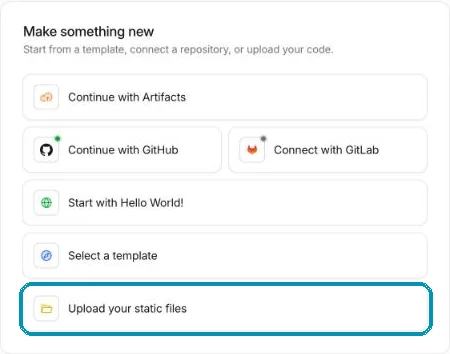
Five ways in – the bottom one is the easiest. Screenshot from wi24rd.com’s Cloudflare account, November 2026. Drag the folder in and publish
Drag the folder into the box, give the project a name and press Deploy. The site is online straight away at an address under
workers.dev.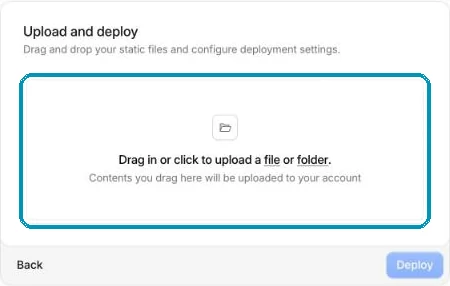
Drag and drop – no command line needed. Screenshot from wi24rd.com’s Cloudflare account, November 2026. Add your domain
Open the project, choose the Domains tab and press Add Domain. The domain must be in Cloudflare – see tip 3. The certificate arrives by itself.

wi24rd.com as a custom domain on the site’s Worker. Screenshot from wi24rd.com’s Cloudflare account, November 2026. Next time: connect GitHub
Choose Continue with GitHub instead of upload, and the site is published automatically every time you save a change. Then there is also a history of every single change.
Cancel only when everything works
Check the site on the domain, and remember mail: if your mail is at the web host, it must be moved separately – see tip 6. Only then cancel the web host.
Honest about the limits
Not everything can be static.
- Web shops, booking and member logins need a platform. Use a hosted service for that part, and keep the rest static.
- Contact forms can be handled with a small Worker, Turnstile against spam and Cloudflare’s Email Service – or a form service.
- Code that runs on every visit has a free daily quota. Static files do not count.
Without Cloudflare
Static sites can also live for free at e.g. GitHub Pages or Netlify. The principle is the same: no server to look after.
About this tip
wi24rd.com is built this way – the machine room shows how. The steps and buttons were checked in Cloudflare’s dashboard on 1 November 2026.
The man behind Wi24rd has used Cloudflare himself since he saw them at Black Hat in London in 2015. Wi24rd has no financial interest in Cloudflare – no money, discounts or services.

Missing a tip?
Write what you would like explained. The next security tip could be yours.