
Security tip 3 · Behind Cloudflare
Put your domain behind Cloudflare.
When traffic goes through Cloudflare, DDoS protection and a free ruleset against known attacks stand in front of the site from the first minute. It costs nothing, and most of the time is spent waiting for DNS.
Last checked 1 November 2026
- Time
- ~30 min + waiting for DNS
- Price
- Free Cloudflare’s free plan
- Protects
- Websites HTTP/HTTPS
- Needs
- Access to the domain at the registrar
Why
Without a shield, everything hits your server directly.
When a website points straight at a server, the server’s address is public. Then it gets every single request – including the robots looking for password files, old WordPress installs and known holes. The server has to turn them all away itself, and every hole in the software stays open until someone updates.
With Cloudflare’s proxy – the orange cloud – traffic first goes through Cloudflare’s network. Here DDoS protection and the Cloudflare Free Managed Ruleset stop the most widespread attacks before they arrive. The ruleset is switched on automatically on the free plan, and Cloudflare adds new rules when a serious hole becomes known.
- Visitorlooks up the domain
- Cloudflareclose to the visitor
- Filterknown attacks out
- Your servergets the rest
On wi24rd.com
The whole site sits behind Cloudflare on the free plan. On Right now you can see the known vulnerabilities the ruleset has caught – including attacks on WordPress and React, which the site does not even run.

Before you start
Three things to have ready.
- A login at the registrar – where the domain was bought. This is where the nameservers are changed.
- A list of your current DNS records – especially mail (MX), SPF and DKIM. A screenshot is enough. Then you can check that nothing disappears in the move.
- DNSSEC switched off at the old provider, if it is on. Otherwise the domain can stop working when the nameservers change. You switch it on again in Cloudflare afterwards.
Step by step · Cloudflare
Seven steps, about 30 minutes.
Create an account and add the domain
Go to dash.cloudflare.com, create an account and choose to add a domain. Pick the Free plan.
Compare the DNS records
Cloudflare fetches the records it can find. Compare with your list and add anything missing – especially mail. Records for mail (e.g.
mailand MX) must be DNS only (grey cloud), because the proxy only works for websites.Change the nameservers
Cloudflare shows two nameservers, e.g.
ada.ns.cloudflare.com. Enter them at the registrar instead of the old ones. It can take from minutes to a day before Cloudflare marks the domain Active, and you get an email.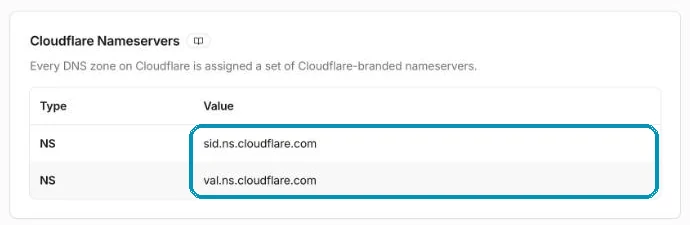
DNS → Settings shows the domain’s two nameservers. These are the ones to enter at the registrar. Screenshot from wi24rd.com’s Cloudflare account, November 2026. Switch on the orange cloud
Under DNS → Records, set Proxied (orange cloud) on the records that point to the website – typically the domain itself and
www. Only now does traffic go through the shield.
The orange cloud and Proxied mean traffic goes through the shield. The CAA records from tip 2 are DNS only. Screenshot from wi24rd.com’s Cloudflare account, November 2026. Choose the right encryption
Under SSL/TLS → Overview, press Configure. If your server has a valid certificate, choose Full (Strict) – or Automatic SSL/TLS, which Cloudflare itself recommends and which picks the safest mode your server can handle. Avoid Flexible, because then traffic travels unencrypted for the last leg to the server. Under Edge Certificates, also switch on Always Use HTTPS and set Minimum TLS Version to TLS 1.2, so old, weak connections are refused.
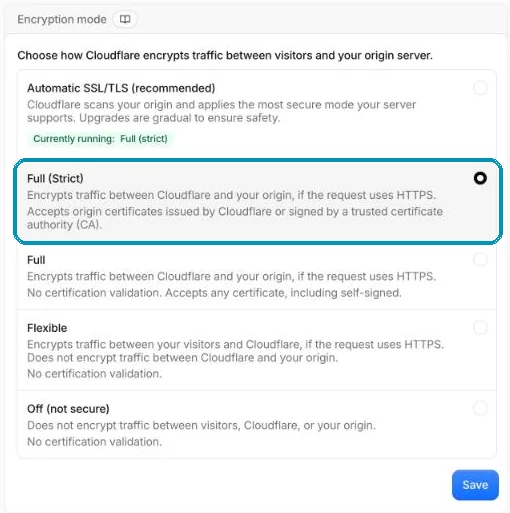
Choose Full (Strict) or Automatic. wi24rd.com is on Full (Strict). Screenshot from wi24rd.com’s Cloudflare account, November 2026. 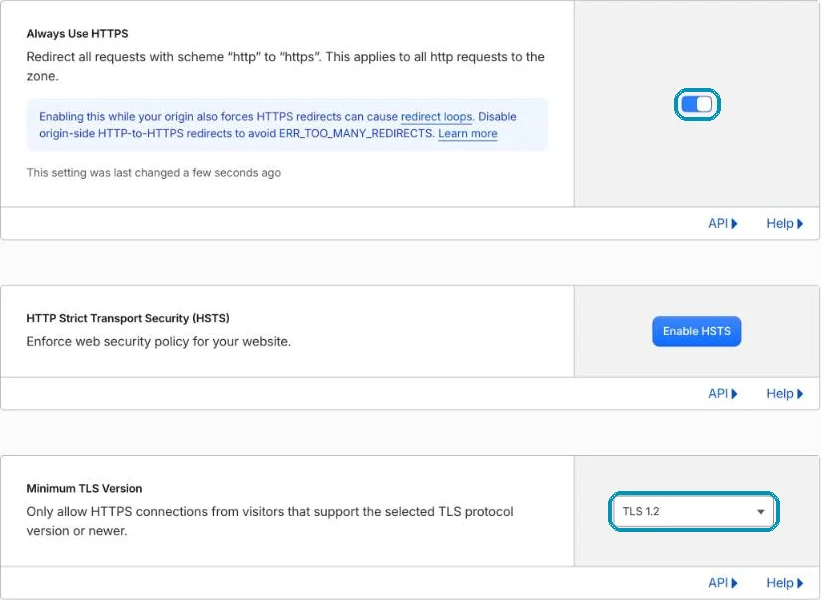
SSL/TLS → Edge Certificates: Always Use HTTPS is on, and Minimum TLS Version is TLS 1.2. Screenshot from wi24rd.com’s Cloudflare account, November 2026. Switch DNSSEC back on
Under DNS → Settings, switch DNSSEC on and copy the DS record to the registrar. Then nobody can pretend to be your domain in DNS.
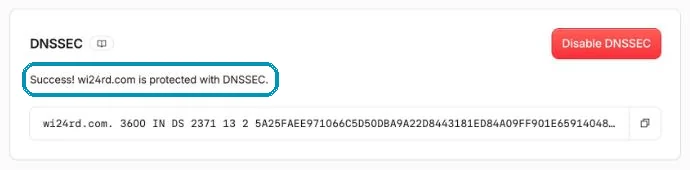
Once the DS record is in place at the registrar, Cloudflare reports success. Screenshot from wi24rd.com’s Cloudflare account, November 2026. Check that it works
Run the commands below. If the domain answers with Cloudflare addresses and
cf-rayis in the response, traffic goes through the shield. Under Security → Analytics you can see what is caught.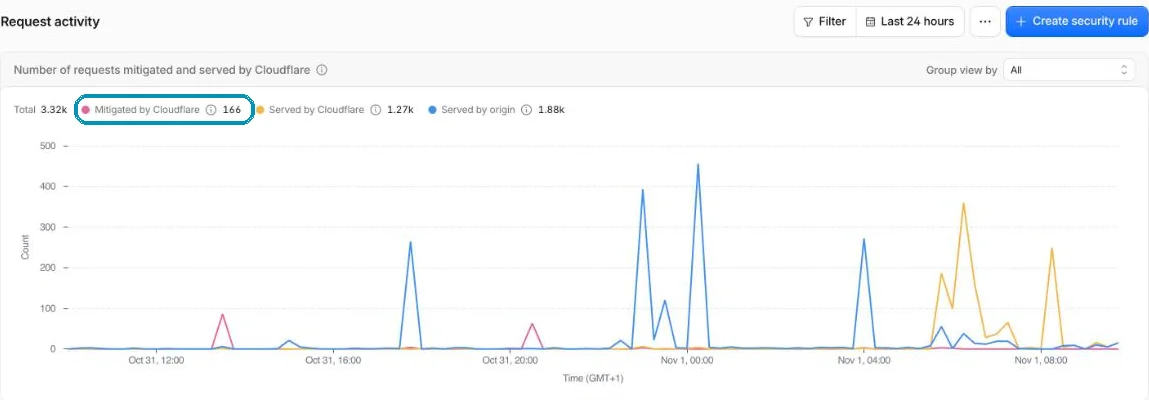
Security → Analytics: the pink line is what Cloudflare caught in the last day. Screenshot from wi24rd.com’s Cloudflare account, November 2026.
dig yourdomain.com +short
curl -sI https://yourdomain.com | grep -i cf-ray
On Windows: nslookup yourdomain.com. The addresses should be in Cloudflare’s network – not your server’s own.
Close the back door
The shield only works if nobody can walk around it.
If an attacker knows your server’s real address, they can still go straight to it. The old address can linger in historical DNS lookups for years.
Allow only Cloudflare
Let the server’s firewall only accept web traffic from Cloudflare’s IP addresses. Ask your web host if you do not manage the firewall yourself.
Consider a new address
If the site has been directly online for years, ask for a new IP address once the proxy is on.
Keep watch from outside
Shodan Monitor tells you if the server is visible after all.
Honest about the limits
What the shield does not do.
- It does not update your software. The free ruleset covers the most widespread holes – not all of them.
- It only covers the website. Mail, FTP, SSH and remote desktop go around the proxy.
- It does not stop stolen passwords. A login is still a login – hence tip 5 on locking the admin area.
If you do not use Cloudflare, many web hosts and other CDN providers offer a web application firewall. Look for the words WAF and DDoS protection.
About this tip
wi24rd.com has sat behind Cloudflare since launch, and the figures for what the shield catches can be seen live on Right now and in The defences. The steps were checked in Cloudflare’s dashboard on 1 November 2026.
The man behind Wi24rd has used Cloudflare himself since he saw them at Black Hat in London in 2015. Wi24rd has no financial interest in Cloudflare – no money, discounts or services.

Missing a tip?
Write what you would like explained. The next security tip could be yours.