
Security tip 6 · Mail domains
Lock your mail domains.
Anyone can send an email that looks like it comes from you – unless three small DNS records say otherwise. And domains that never send mail can be locked completely. Free with Cloudflare, about 15 minutes per domain.
Last checked 1 November 2026
- Time
- ~15 min per domain
- Price
- Free reports included
- Three records
- SPF · DKIM · DMARC
- Needs
- Access to your DNS
Why
Anyone can write the sender of an email.
Fake invoices, "the CEO needs a gift card" and phishing in your name work because the sender address on an email is as easy to forge as the sender on a postcard. The only thing that stops it is three records in your DNS, which the receiving mail server looks up and trusts.
The big mail providers now use SPF, DKIM and DMARC to sort mail. Without them, your own emails land in spam more often – and the fake ones get through more often.
- SPFwho may send
- DKIMa seal on every email
- DMARCwhat happens if it does not match
- Reportto you, every day
We checked our own 12 domains
- Two domains received mail but had neither SPF nor DMARC.
- On one, DKIM was broken because the records sat behind Cloudflare’s proxy (the orange cloud), so receivers could not find the key.
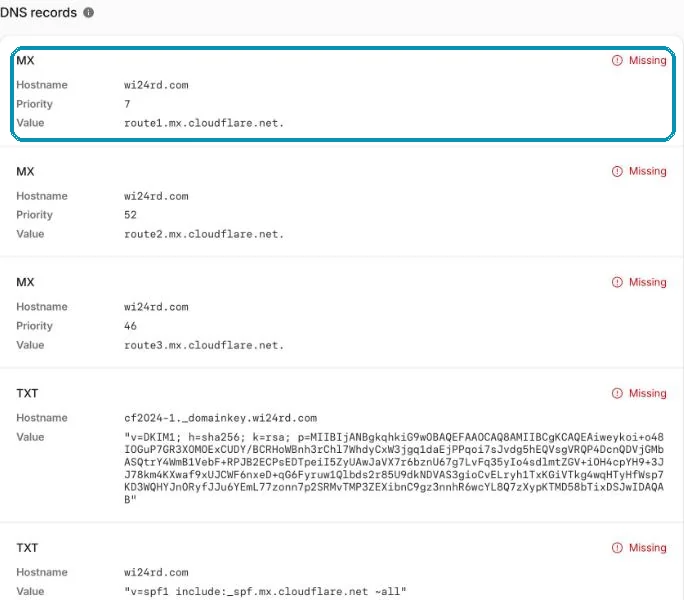
- wi24rd.com had no MX record, so mail to security@ bounced.
- Five domains never sent mail – but were not locked.
All of it is fixed with the steps below.
Domains that send mail
Five steps per domain.
Find out who sends in your name
Your mail provider, but perhaps also a newsletter, a web shop, an invoicing or booking system. Each of them must be in SPF and should sign with DKIM.
Create SPF
In Cloudflare: DNS → Settings → Email Security → Configure, and choose SPF. Enter your provider’s domain under Domains – e.g.
_custspf.one.com(one.com),_spf.protonmail.ch(Proton),spf.protection.outlook.com(Microsoft 365) or_spf.google.com(Google). There may only be one SPF record per domain.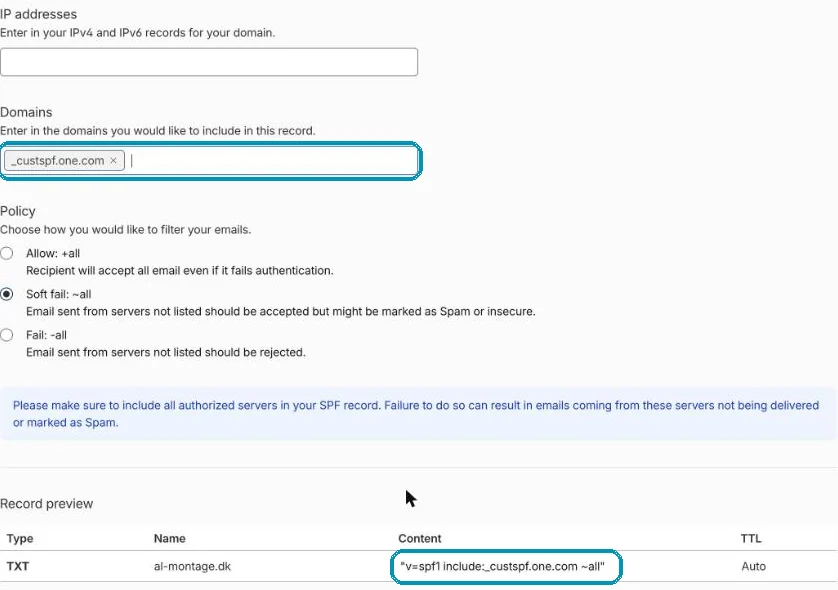
The SPF wizard: the provider under Domains, and the finished record at the bottom. Screenshot from wi24rd.com’s Cloudflare account, November 2026. Turn on DKIM at the provider
DKIM is turned on in the mail provider’s control panel, which then gives you one or more records to put in DNS. Pitfall: if they are CNAME records, they must be DNS only (grey cloud). With the orange cloud, receivers cannot find the key.
Turn on DMARC and the reports
Go to Email → DMARC Management and press Enable DMARC Management. Cloudflare adds a DMARC record with
p=noneand starts collecting reports from the big mail providers – free.
Cloudflare proposes the record itself. The report address is blurred. Screenshot from wi24rd.com’s Cloudflare account, November 2026. 
The overview shows the status of all four on one line. Screenshot from wi24rd.com’s Cloudflare account, November 2026. Tighten after a few weeks
The reports show who sends in your name and whether they pass. When everything legitimate passes, change the DMARC record to
p=quarantine(to spam) and laterp=reject(refuse). Only then does DMARC protect –p=noneonly watches.
dig TXT yourdomain.com +short
dig TXT _dmarc.yourdomain.com +short
On Windows: nslookup -type=TXT _dmarc.yourdomain.com.
Domains without mail
Lock them completely – two clicks.
Old campaign domains, misspellings and domains you bought to protect the name are favourite senders for fraudsters, precisely because nobody watches them.
Open Email Security
DNS → Settings → Email Security → Configure. At the bottom it says Your domain is not used to send email. Press Create records.
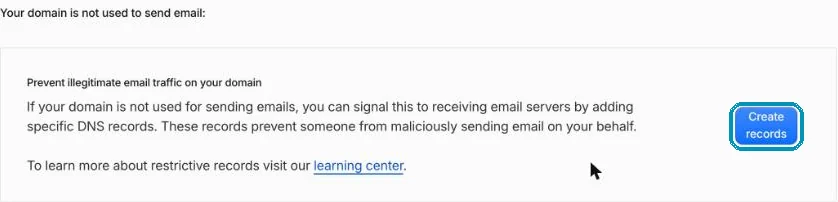
Cloudflare has a button for exactly this. Screenshot from wi24rd.com’s Cloudflare account, November 2026. Approve the three records
Cloudflare proposes
v=spf1 -all(nobody may send), an empty DKIM key for all selectors andDMARC p=reject. Press Submit and confirm.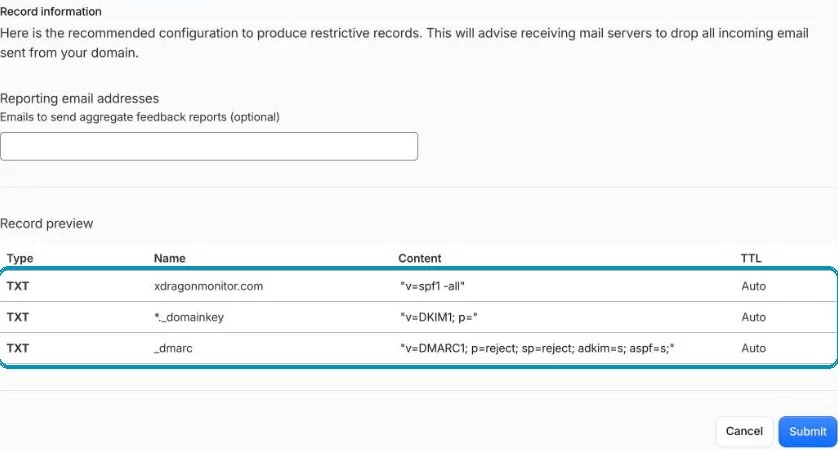
Three records – then receivers refuse anything pretending to come from the domain. Screenshot from wi24rd.com’s Cloudflare account, November 2026.
Receive mail without a mail server
contact@ – forwarded for free.
If a domain must receive mail without you paying for a mailbox, use Email → Email Routing: create a rule such as contact@ → your own mail and press Add missing records. Cloudflare adds MX, SPF and DKIM itself. With Cloudflare’s Email Service, a contact form on the site can also send from the address.

Honest about the limits
What it does not do.
- It does not stop look-alike domains such as
wi24rd-invoice.com. Only attention helps there – and looking at the sender’s domain. p=nonedoes not protect. It only gives reports. Tighten once the reports are clean.- Forwarded mail can fail SPF – which is why DKIM matters: the seal travels with the email.
Without Cloudflare
SPF, DKIM and DMARC are ordinary DNS records and can be set at any DNS provider. The reports can be read with free services – or in your mail provider’s own tools.
About this tip
Wi24rd went through its own 12 domains with this method on 1 November 2026. The screenshots are from that review, and the menus were checked the same day.
The man behind Wi24rd has used Cloudflare himself since he saw them at Black Hat in London in 2015. Wi24rd has no financial interest in Cloudflare – no money, discounts or services.

Missing a tip?
Write what you would like explained. The next security tip could be yours.