
Security tip 8 · Safe DNS
Stop phishing before anyone clicks.
Almost all phishing and malware has to look up a domain name. Let your DNS say no to the known dangerous ones – for the whole office or home, without installing anything. Free.
Last checked 1 November 2026
- Time
- ~5 min in the router
- Price
- Free
- Covers
- Every device on the network
- Needs
- Access to the router
Why
Before every click comes a lookup.
When someone clicks a link in a fake email, the computer first asks DNS: "where is mitid-update.info?". If DNS does not answer, the page never appears. The same goes for malware that needs to phone home.
Safe DNS is a list of known dangerous domains that is updated all the time. It works for every device on the network – including the printer, the TV and the guests’ phones – without installing anything.
Experience
The man behind Wi24rd has used Cloudflare’s DNS services for many years – both the regular one and the filtering version.
The easy level
Three pairs of addresses.
1.1.1.1 · 1.0.0.1- Nothing – fast and private DNS
2606:4700:4700::1111 · ::1001 1.1.1.2 · 1.0.0.2- Known malware and phishing
2606:4700:4700::1112 · ::1002 1.1.1.3 · 1.0.0.3- Malware, phishing and adult content
2606:4700:4700::1113 · ::1003
Step by step
Five steps, about 5 minutes.
Choose a filter
For an office:
1.1.1.2and1.0.0.2. For a home with children:1.1.1.3and1.0.0.3.Enter them in the router
Find the DNS settings for the internet connection (WAN) in the router and replace the provider’s DNS with the pair. If you have IPv6, set the IPv6 pair too. Then every device gets the filter via the router.
Never mix the pairs
If e.g.
1.1.1.2is first and1.1.1.1second, devices use both in turn – and a phishing domain is blocked one moment and let through the next.Bring the browsers along
Chrome, Edge and Firefox can use encrypted DNS directly and bypass the router. Set them to the same filter:
https://security.cloudflare-dns.com/dns-query(malware) orhttps://family.cloudflare-dns.com/dns-query(family). On Android: Private DNS =security.cloudflare-dns.com.Test it
Cloudflare has a test domain that is always on the malware list. With the filter on, it answers
0.0.0.0; without, it answers with a real address.
nslookup malware.testcategory.comThe answer should be 0.0.0.0 when the filter works.
Next level
Cloudflare Gateway: your own filter.
1.1.1.2 and 1.1.1.3 are ready-made lists with no settings and no log. Gateway – part of Cloudflare Zero Trust, free for up to 50 users – lets you choose categories yourself (e.g. newly registered domains, where much phishing lives), make your own block and allow lists and see in a log what was stopped.
Start the wizard
Zero Trust → Traffic controls → Overview, and choose Protect a network with DNS filtering.
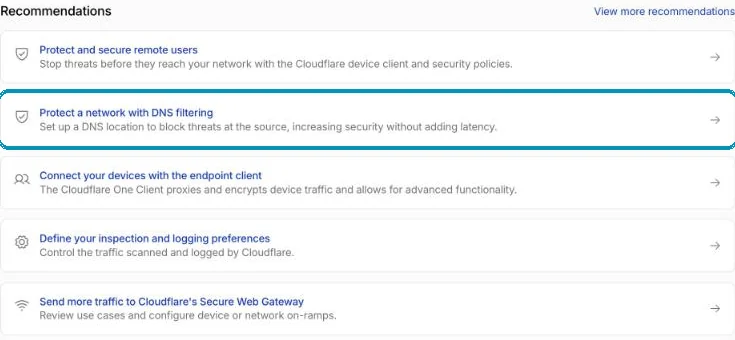
The wizard takes four steps and about six minutes. Screenshot from wi24rd.com’s Cloudflare account, November 2026. Name your DNS location
Gateway suggests your public IP address so it can recognise your network. Then you point the router at the addresses Gateway gives you and choose the categories to block.
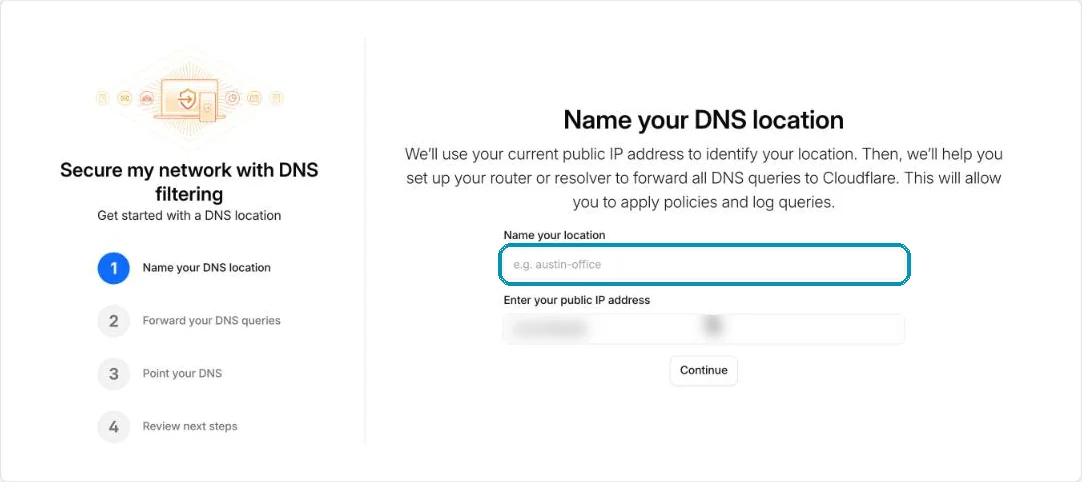
The IP address is blurred. Screenshot from wi24rd.com’s Cloudflare account, November 2026.
Shared IP address? Housing association, dorm, mobile network
If you share a public IP with others, Gateway cannot recognise your network by the address. Use instead the personal encrypted-DNS address each location gets – in a router that supports DNS over HTTPS, in a small forwarder such as Pi-hole or AdGuard Home, or directly in browsers and phones.
Honest about the limits
A filter – not a shield.
- Only known domains are stopped. A brand-new phishing domain can get through in its first hours.
- It can be bypassed by programs that use their own DNS or a fixed IP address.
- Cloudflare sees your DNS lookups. Whatever DNS provider you use does – choose one you trust.
Together with the other tips
Safe DNS protects when someone clicks. Tip 6 makes it harder to send fake emails in your name in the first place.
About this tip
The addresses and the test domain were checked on 1 November 2026: malware.testcategory.com answered 0.0.0.0 via 1.1.1.2 and 1.1.1.3 and a real address via 1.1.1.1. The Gateway wizard was checked in Cloudflare’s dashboard the same day.
The man behind Wi24rd has used Cloudflare himself since he saw them at Black Hat in London in 2015. Wi24rd has no financial interest in Cloudflare – no money, discounts or services.

Missing a tip?
Write what you would like explained. The next security tip could be yours.