
Security tip 4 · Bot protection
Switch on the bot protection.
Most of the traffic to a small site is robots. With two switches in Cloudflare, the known malicious ones get an expensive challenge, and the dishonest crawlers end up in a maze of fake pages.
Last checked 1 November 2026
- Time
- ~5 min
- Price
- Free Cloudflare’s free plan
- Two switches
- Bot Fight Mode + AI Labyrinth
- Needs
- Domain behind Cloudflare tip 3
Why
The robots do not ask permission.
Some robots are good: search engines that find your site, and monitoring you set up yourself. Others hunt for passwords, old logins and holes – or fetch the whole site to train AI models without asking.
Cloudflare sees traffic from a large part of the internet and therefore knows the patterns. The bot protection uses that to tell them apart – and to check that a robot calling itself Google actually comes from Google’s network.
Two defences that work differently
Bot Fight Mode is the barrier. Traffic that looks like known malicious robots gets a computationally heavy challenge that a browser handles without the visitor noticing, but which makes it expensive for the robot.
AI Labyrinth is the trap. Cloudflare adds invisible links, marked nofollow, to your pages. Honest robots do not follow them. Those that ignore the rules end up in an endless maze of generated pages instead of your content. It does not block – it wastes the robot’s time and exposes it.
Step by step · Cloudflare
Six steps, about 5 minutes.
Open the security settings
Log in to dash.cloudflare.com, choose the domain and go to Security → Settings. Choose Bot traffic under Filter by groups.
Switch on Bot Fight Mode
Find Bot fight mode and switch it on. It applies to the whole domain straight away.
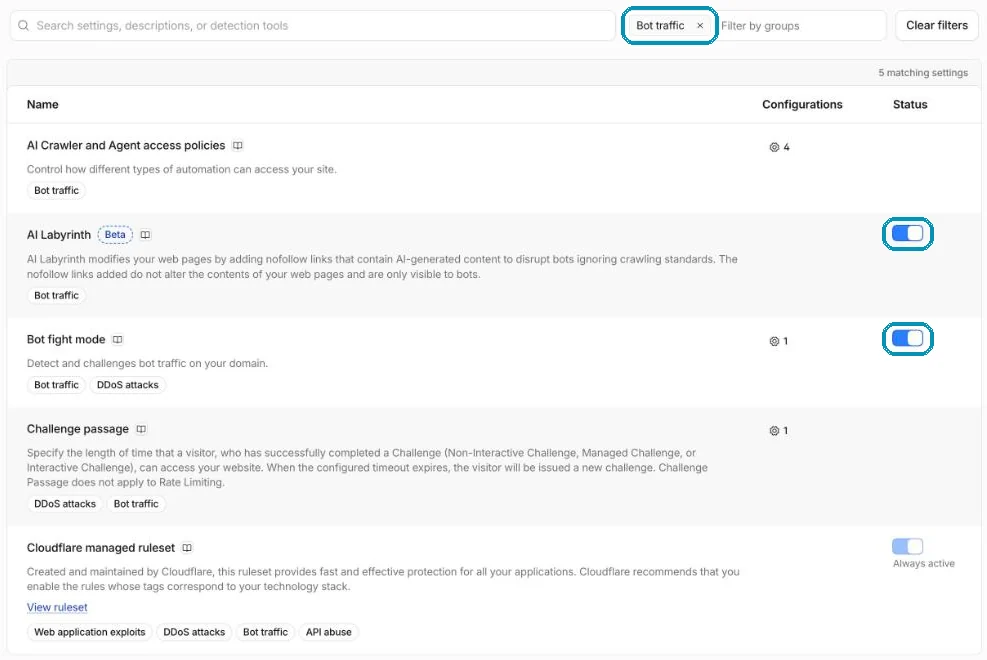
Security → Settings filtered by Bot traffic. Both switches are on for wi24rd.com. Screenshot from wi24rd.com’s Cloudflare account, November 2026. Switch on AI Labyrinth
Find AI Labyrinth in the same list and switch it on. It does not change how the site looks, and according to Cloudflare it does not affect your search ranking either.
Decide what AI robots may do
Choose AI Crawler and Agent access policies. There are three kinds: Search (robots that make you visible in search), Training (collection for training AI models) and Agents (an AI acting for a person). For each, you can block everywhere, only on pages with ads, or allow. If you want to be found in AI search, leave Search allowed.
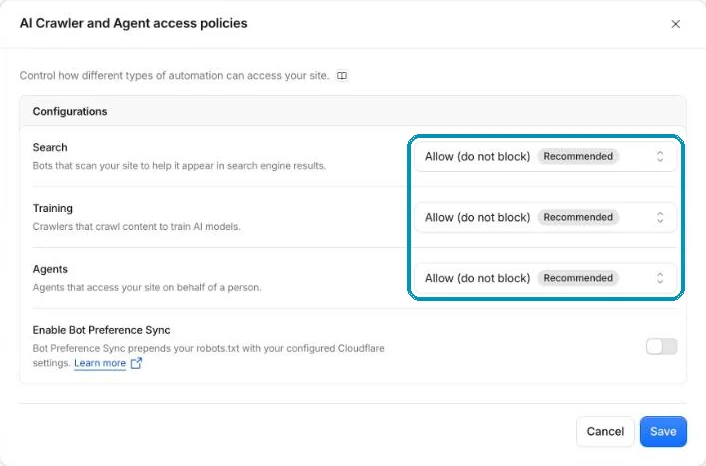
Three choices – one for each kind of AI robot. wi24rd.com allows all three, because the site wants to be found by AI search. Screenshot from wi24rd.com’s Cloudflare account, November 2026. Test your own things
Bot Fight Mode can challenge traffic from apps, APIs, webhooks and monitoring tools, and on the free plan it cannot be switched off for selected paths. Check that your own integrations still work. If the site uses a Content Security Policy, the path
/cdn-cgi/challenge-platform/must be allowed.See what is caught
Under Security → Analytics and Events, you can filter by the services Bot fight mode and AI Labyrinth. For the labyrinth there are two kinds of event: Served (trap links were added to a page) and Crawls (a robot walked into the trap).
On wi24rd.com
Both switches are on here.
On Right now you can watch them work: which paths the robots tried and where they came from. The crawlers shows the robots that called themselves Google or similar but did not come from the network they claimed.
The labyrinth also caught one of our own test scripts. That is exactly what it should do: a script that does not behave like a browser gets treated as a robot.
Honest about the limits
What the bot protection does not do.
- It does not catch everything. Advanced robots that imitate a real browser get through. For that there are Cloudflare’s paid Super Bot Fight Mode and Bot Management.
- The labyrinth is not a block. It marks robots and wastes their time. The barrier and the ruleset are what stop them.
- robots.txt is a polite request. Honest robots follow it – the others are the reason the defences exist.
About this tip
The steps and the names of the switches were checked in Cloudflare’s dashboard and documentation on 1 November 2026. AI Labyrinth is still marked as beta by Cloudflare.
The man behind Wi24rd has used Cloudflare himself since he saw them at Black Hat in London in 2015. Wi24rd has no financial interest in Cloudflare – no money, discounts or services.

Missing a tip?
Write what you would like explained. The next security tip could be yours.